


Problem Framing
The Problem
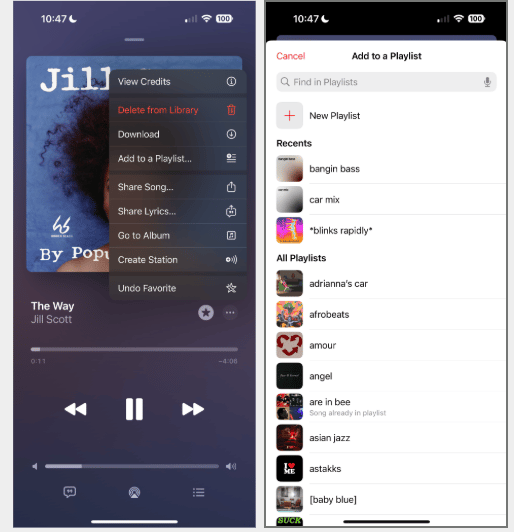
Apple Music currently offers an "Add to a Playlist" feature, but it lacks deeper personalization options that reflect individual user listening habits and preferences.
There is an opportunity to explore and enhance this feature to make the experience more personalized, intuitive, and aligned with users' unique music tastes and habits.

How Might We
"How might we make smart playlists more intuitive and personalized to match users' unique music tastes?"
Proto-Persona
Who We're Designing For
Before conducting research, I developed a proto-persona to ground the design work in a realistic user archetype and surface the most critical needs to address.
A
Angela
Playlist Curator · 25
Demographics
·
25 years old
·
Lives in a big city
·
Self-employed
Behaviours
·
Uses Apple Music & Spotify 8+ hours/day
·
Has many different moods for songs
·
Creates a new playlist every day
Needs & Goals

Add a song to more than one playlist at a time
Know which playlist she added to last
Access to many playlist options quickly
User Stories
As Angela · Frequent Playlist Creator
"I want to add a song to multiple playlists so I can save time when I'm curating music."
As Akeem · Casual Listener
"I want my playlists organized so I can listen to my music by mood or genre."
The Opportunity
Users want music experiences that feel personal and reflect their unique listening habits. This case study explores ways to enhance the playlist feature to make it more intuitive and better aligned with individual music tastes.
My Design Process
Three-Phase Approach

Phase 01
Research
I explored the app's existing playlist feature and identified pain points through usability testing with 4 participants.

Phase 02
Design
Based on insights from testing, I designed new features to improve personalization and ease of use.

Phase 03
Testing
I validated the new designs through follow-up feedback, ensuring they better aligned with user needs and habits.

Phase 01 · Research
Research
Understanding the Current Experience
To understand the current user experience, I conducted a walkthrough of Apple Music's playlist features and noted areas lacking in personalization and clarity. I then performed Zoom usability testing with 4 participants, focusing on how they create and interact with playlists.

App Walkthrough
A thorough review of Apple Music's existing playlist feature to map the current experience and identify friction points before talking to users.

Zoom Usability Testing
Moderated sessions with 4 participants focused on how they create and interact with playlists — observing real behavior, not just stated preferences.
Pain Points Uncovered
×
Limited customization options when creating or editing playlists
×
Unclear navigation — users couldn't easily find playlist management tools
×
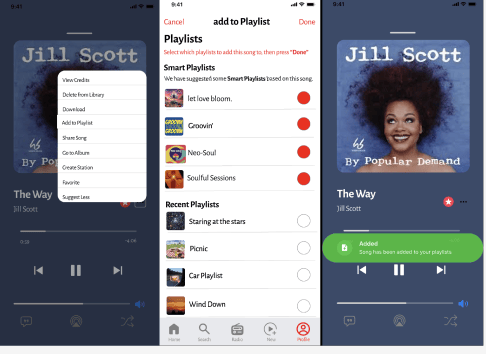
No way to add a single song to multiple playlists at once
×
Disconnect between music recommendations and actual user preferences
×
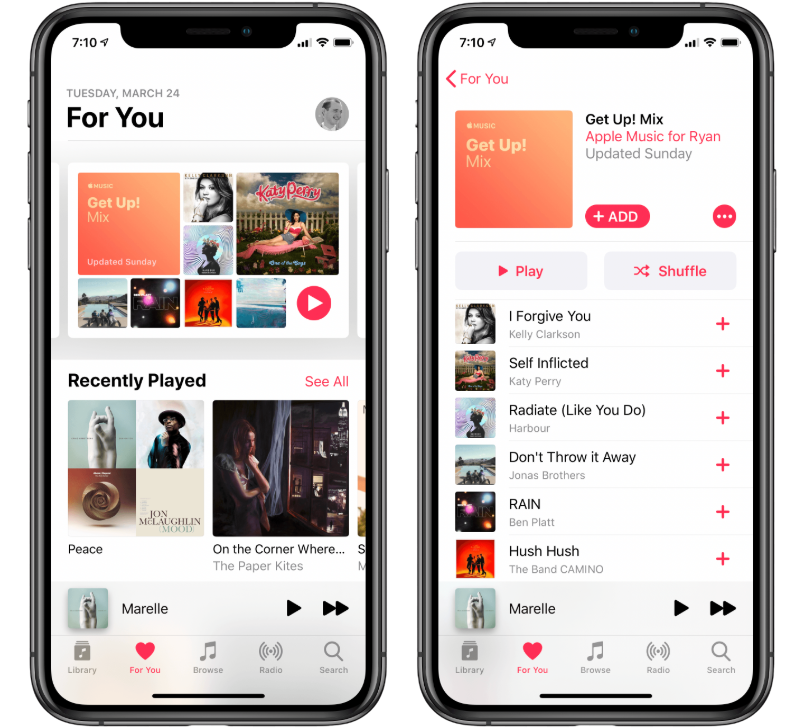
No mood- or genre-based smart playlist builder
×
No indicator of which playlist a song was most recently added to

Phase 02 · Design
Design
Designing the Solution
Using insights from research and usability testing, I ideated features that would make playlist creation more intuitive and personalized. I sketched user flows and wireframes, then refined concepts into mid-fidelity prototypes before moving to higher fidelity iterations.

Feature 01 · Add One Song to Multiple Playlists
Version 1 — Before Testing

Version 2 — After Testing

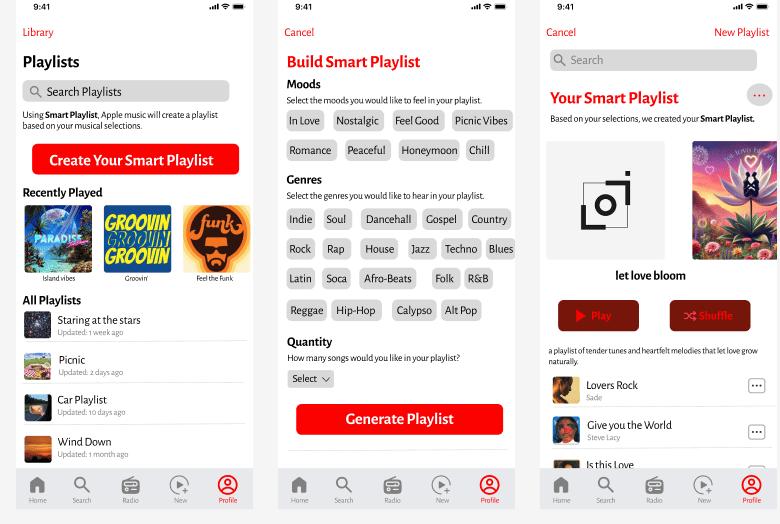
Feature 02 · Smart Playlist Builder
Version 1 — Before Testing

Version 2 — After Testing

Phase 03 · Testing
Usability Testing
Validating the Designs
I conducted two rounds of usability testing with the same 4 participants to evaluate the new designs. Feedback showed improved clarity, faster task completion, and higher satisfaction with playlist customization.
2
Testing Rounds
Same 4 participants each time
4
Participants
Consistent panel for reliable comparison
100%
Task Completion
All users completed tasks more efficiently
✓
Improved Clarity
Participants navigated the redesigned features with noticeably less confusion, particularly around adding songs to multiple playlists.
✓
Faster Task Completion
Users completed playlist-related tasks more efficiently with the new interface compared to the original Apple Music flow.
✓
Higher Satisfaction
All 4 participants noted that the experience felt more personalized and aligned with how they actually listen to music.
✓
Smart Builder Approval
The mood/genre/quantity builder resonated strongly — users appreciated being in control of what the smart playlist generated.
Usability Testing Plan
Testing Summary & Synthesis
After two rounds of testing with 4 participants, I synthesized findings into insights, themes, patterns, direct quotes, and user suggestions to guide the next iteration.
Top Insight
Focus more on the Smart Playlist feature and add more choices for interaction — this would make the feature significantly more personalized and user-driven.
Additionally: review multiple playlist options and groupings to reduce cognitive load.
Themes
Confusion with Smart Playlist and lack of interaction
Easy-flowing interactions with adding a song to multiple playlists
Patterns
⚠
Users thought the genre and mood labels in Smart Playlist were interactive buttons — and were confused when they weren't.
⚠
Users didn't connect with the song selections in Smart Playlist because they weren't personally familiar with the suggested songs.
✓
Users moved through the 'adding songs to multiple playlists' feature easily with no notable friction.
User Quotes
I thought I was able to press 'Nostalgic' and the playlist be curated from that vibe.
On the Smart Playlist mood labels
I wish Apple Music suggested more upcoming and underground artists in suggested songs.
On Smart Playlist song suggestions
User Suggestions
🎛️
Make genre and mood buttons interactive
Users want to tap a mood or genre and have the Smart Playlist build itself from that selection — not just display it as a label.
✨
More personalized Smart Playlist curation
Users want the Smart Playlist to go beyond recent listening history — incorporating taste, discovery, and even underground or upcoming artists.
Explore More Work
View other case studies or reach out to discuss this project.

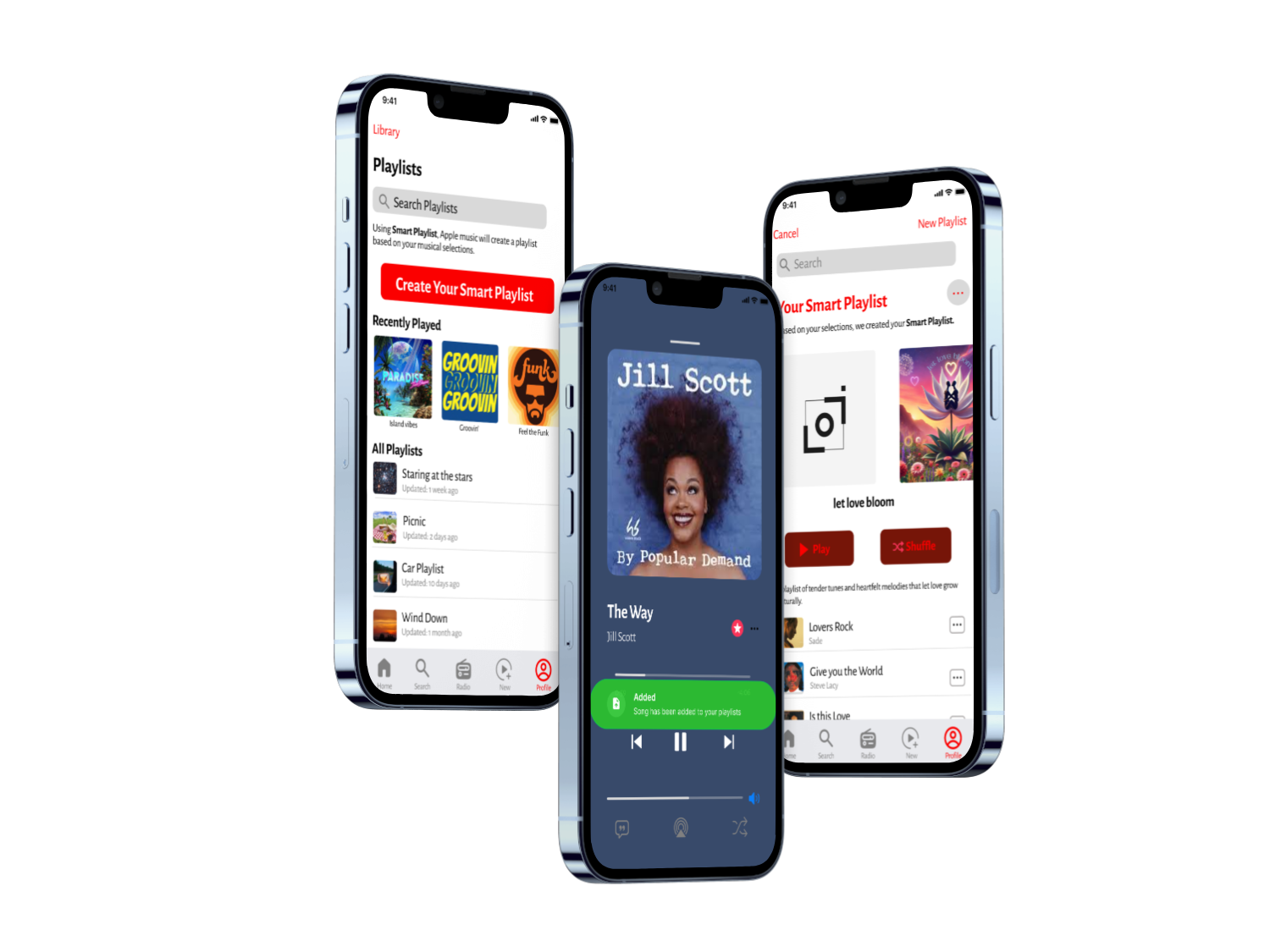
Feature Design · UX Research · iOS
Apple Music
Playlist Feature
Enhancing Apple Music's playlist experience to make it more personalized, intuitive, and aligned with how people actually listen.
Role
UX Designer
Method
Usability Testing
Participants
4 Users · 2 Rounds
TIMELINE
8 weeks
Reflection
Impact & Next Steps
What Was Achieved

The redesign successfully addressed key usability issues and improved user satisfaction around playlist personalization.
The redesigned smart playlist feature led to increased user satisfaction, with participants noting improved ease of use and better alignment with their music preferences.
All 4 users completed tasks more efficiently and felt the experience was more personalized and intuitive.
Looking Forward
Broader Testing
Conduct testing with a more diverse user group to surface edge cases and varied listening habits.
Listening Behavior Integration
Explore integration with listening behavior data to make smart playlists even more accurate and personalized.
Full Implementation
Refine the feature for full implementation within Apple Music's existing design system and iOS guidelines.


Feature Design · UX Research · iOS
Apple Music
Playlist Feature
Enhancing Apple Music's playlist experience to make it more personalized, intuitive, and aligned with how people actually listen.
Role
UX Designer
Method
Usability Testing
Participants
4 Users · 2 Rounds
Timeline
8 weeks
Problem Framing
The Problem
Apple Music currently offers an "Add to a Playlist" feature, but it lacks deeper personalization options that reflect individual user listening habits and preferences.
There is an opportunity to explore and enhance this feature to make the experience more personalized, intuitive, and aligned with users' unique music tastes and habits.

How Might We
"How might we make smart playlists more intuitive and personalized to match users' unique music tastes?"
Proto-Persona
Who We're Designing For
Before conducting research, I developed a proto-persona to ground the design work in a realistic user archetype and surface the most critical needs to address.
A
Angela
Playlist Curator · 25
Demographics
·
25 years old
·
Lives in a big city
·
Self-employed
Behaviours
·
Uses Apple Music & Spotify 8+ hours/day
·
Has many different moods for songs
·
Creates a new playlist every day
Needs & Goals

Add a song to more than one playlist at a time
Know which playlist she added to last
Access to many playlist options quickly
User Stories
As Angela · Frequent Playlist Creator
"I want to add a song to multiple playlists so I can save time when I'm curating music."
As Akeem · Casual Listener
"I want my playlists organized so I can listen to my music by mood or genre."
The Opportunity
Users want music experiences that feel personal and reflect their unique listening habits. This case study explores ways to enhance the playlist feature to make it more intuitive and better aligned with individual music tastes.
My Design Process
Three-Phase Approach

Phase 01
Research
I explored the app's existing playlist feature and identified pain points through usability testing with 4 participants.

Phase 02
Design
Based on insights from testing, I designed new features to improve personalization and ease of use.

Phase 03
Testing
I validated the new designs through follow-up feedback, ensuring they better aligned with user needs and habits.

Phase 01 · Research
Research
Understanding the Current Experience
To understand the current user experience, I conducted a walkthrough of Apple Music's playlist features and noted areas lacking in personalization and clarity. I then performed Zoom usability testing with 4 participants, focusing on how they create and interact with playlists.

App Walkthrough
A thorough review of Apple Music's existing playlist feature to map the current experience and identify friction points before talking to users.

Zoom Usability Testing
Moderated sessions with 4 participants focused on how they create and interact with playlists — observing real behavior, not just stated preferences.
Pain Points Uncovered
×
Limited customization options when creating or editing playlists
×
Unclear navigation — users couldn't easily find playlist management tools
×
No way to add a single song to multiple playlists at once
×
Disconnect between music recommendations and actual user preferences
×
No mood- or genre-based smart playlist builder
×
No indicator of which playlist a song was most recently added to

Phase 02 · Design
Design
Designing the Solution
Using insights from research and usability testing, I ideated features that would make playlist creation more intuitive and personalized. I sketched user flows and wireframes, then refined concepts into mid-fidelity prototypes before moving to higher fidelity iterations.

Feature 01 · Add One Song to Multiple Playlists
Version 1 — Before Testing

Version 2 — After Testing

Feature 02 · Smart Playlist Builder
Version 1 — Before Testing

Version 2 — After Testing

Phase 03 · Testing
Usability Testing
Validating the Designs
I conducted two rounds of usability testing with the same 4 participants to evaluate the new designs. Feedback showed improved clarity, faster task completion, and higher satisfaction with playlist customization.
2
Testing Rounds
Same 4 participants each time
4
Participants
Consistent panel for reliable comparison
100%
Task Completion
All users completed tasks more efficiently
✓
Improved Clarity
Participants navigated the redesigned features with noticeably less confusion, particularly around adding songs to multiple playlists.
✓
Faster Task Completion
Users completed playlist-related tasks more efficiently with the new interface compared to the original Apple Music flow.
✓
Higher Satisfaction
All 4 participants noted that the experience felt more personalized and aligned with how they actually listen to music.
✓
Smart Builder Approval
The mood/genre/quantity builder resonated strongly — users appreciated being in control of what the smart playlist generated.
Usability Testing Plan
Testing Summary & Synthesis
After two rounds of testing with 4 participants, I synthesized findings into insights, themes, patterns, direct quotes, and user suggestions to guide the next iteration.
Top Insight
Focus more on the Smart Playlist feature and add more choices for interaction — this would make the feature significantly more personalized and user-driven.
Additionally: review multiple playlist options and groupings to reduce cognitive load.
Themes
Confusion with Smart Playlist and lack of interaction
Easy-flowing interactions with adding a song to multiple playlists
Patterns
⚠
Users thought the genre and mood labels in Smart Playlist were interactive buttons — and were confused when they weren't.
⚠
Users didn't connect with the song selections in Smart Playlist because they weren't personally familiar with the suggested songs.
✓
Users moved through the 'adding songs to multiple playlists' feature easily with no notable friction.
User Quotes
I thought I was able to press 'Nostalgic' and the playlist be curated from that vibe.
On the Smart Playlist mood labels
I wish Apple Music suggested more upcoming and underground artists in suggested songs.
On Smart Playlist song suggestions
User Suggestions
🎛️
Make genre and mood buttons interactive
Users want to tap a mood or genre and have the Smart Playlist build itself from that selection — not just display it as a label.
✨
More personalized Smart Playlist curation
Users want the Smart Playlist to go beyond recent listening history — incorporating taste, discovery, and even underground or upcoming artists.
Reflection
Impact & Next Steps
What Was Achieved

The redesign successfully addressed key usability issues and improved user satisfaction around playlist personalization.
The redesigned smart playlist feature led to increased user satisfaction, with participants noting improved ease of use and better alignment with their music preferences.
All 4 users completed tasks more efficiently and felt the experience was more personalized and intuitive.
Looking Forward
Broader Testing
Conduct testing with a more diverse user group to surface edge cases and varied listening habits.
Listening Behavior Integration
Explore integration with listening behavior data to make smart playlists even more accurate and personalized.
Full Implementation
Refine the feature for full implementation within Apple Music's existing design system and iOS guidelines.
Explore More Work
View other case studies or reach out to discuss this project.
